PrintSent
Same Workflow, No Paper

Go paperless with your Dealertrack DMS

PrintSent can capture any form from Dealertrack — with full logos and branding — and delivers it as a PDF your team can open in a secure web portal, or have sent to their inbox. Your staff prints like they always have. You choose what actually needs paper.

PrintSent is an independent product and is not affiliated with, endorsed by, sponsored by, or certified by Dealertrack or its affiliates. Dealertrack and all other product names, logos, and brands are the property of their respective owners and are used here only to describe compatibility.

Works with Dealertrack DMSEmulates fully compliant printersEncrypted PDF deliverySetup under 30 minutesNo long-term contract
Watch

See PrintSent in action

A quick walkthrough of how PrintSent turns Dealertrack printing into instant, branded PDFs in a shared web portal — view, email, or download.

Want a guided tour of the software? Watch the 4-minute demo →

What is PrintSent?

A virtual printer for Dealertrack DMS

PrintSent is a virtual printer solution for Dealertrack DMS dealerships that eliminates the need for physical printing. It works by placing a small, pre-configured network device on your dealership's Dealertrack VPN-connected network. The device emulates one or more fully compliant network printers — the same printer type Dealertrack is built to work with — so Dealertrack recognizes it immediately with no additional software or configuration changes.

When any staff member clicks "Print" in Dealertrack, the print job is captured by the PrintSent device with full logos, formatting, and branding intact. The document is then converted to a pixel-perfect PDF within seconds — ready for your team the moment it prints. Assigned staff open every document in a secure web portal to view, email, or download it — and, if you like, each document type (Repair Orders, Purchase Orders, Invoices, Statements, and more) can also be auto-routed to configured recipients or a shared department inbox.

Where Dealertrack's built-in QPRINT option is built for quick text-only output, PrintSent preserves the complete visual layout of every form exactly as it would appear on a printed page. The device supports assigning multiple IP addresses, allowing a single unit to emulate multiple printers simultaneously across departments.

PrintSent requires no software installation on any workstation, no changes to existing Dealertrack workflows, and no staff training. Setup takes under 30 minutes. The device connects with a single ethernet cable and power cable and can be stored in a server closet or on an IT shelf.

Explore it by topic on the Dealertrack hub: printing to PDF, printing to email, going paperless, and how it compares to QPRINT.
The Problem

Your team is printing documents just to email them

When a customer needs a receipt or a vendor needs a statement, your staff prints the document, walks to the printer, scans it back in, emails it to themselves, then forwards it. This happens dozens of times a day across every dealership.

01

Print it

Print the document to get the logos and formatting right.

02

Scan it back in

Walk to the printer, scan, email it to yourself.

03

Forward it

Finally forward the scanned copy to the customer.

Dealertrack is a powerful DMS — but some of its forms are designed for physical printers, and the built-in QPRINT option doesn't include logos or formatting on any forms. PrintSent bridges that gap, giving you full-fidelity PDFs and eliminating the print-scan-email cycle entirely.

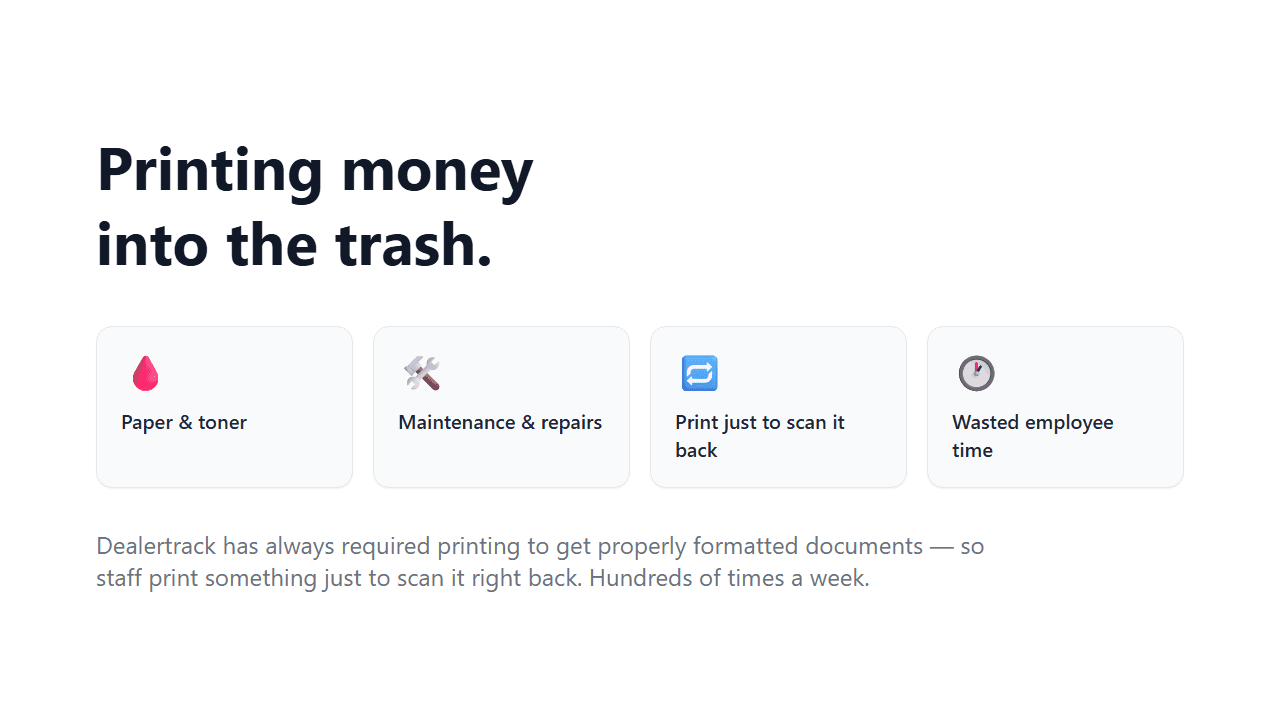
The hidden cost of Dealertrack printing — paper and toner, maintenance and repairs, print-just-to-scan, and wasted employee time.
The Vision

The paperless dealership is finally possible

Dealertrack already powers your dealership. PrintSent extends it so every department can go digital. Your staff still clicks "Print" — but instead of paper, the PDF appears instantly in a shared web portal, ready to view, email, or download.

Service

Repair Orders, Tech Cards, warranty documents

Parts

Purchase Orders, parts & credit invoices, picking tickets, quotes & schematics

Admin / Accounting

Statements, receipts, financial reports

Print to the PrintSent virtual printer and the job instantly becomes a perfect, ready-to-use PDF.
Virtual Printer Setup

Three steps. Under 30 minutes.

1

We ship you a small network device

Pre-configured and ready to go. This small network device plugs into your Dealertrack VPN-connected network with an ethernet and power cable — tuck it in a server closet, IT shelf, or wherever is convenient.

2

Add it to Dealertrack as a Lexmark printer

Dealertrack detects it as a Lexmark printer — because that's what it emulates. Assign multiple IP addresses to create multiple virtual printers across departments. Send Logos, done.

3

Every PDF in one shared tray

The moment you print, the PDF appears in your web portal — view it, download it, or auto-route it to the right people (Repair Orders to service, Statements to accounting). Set once, runs automatically.

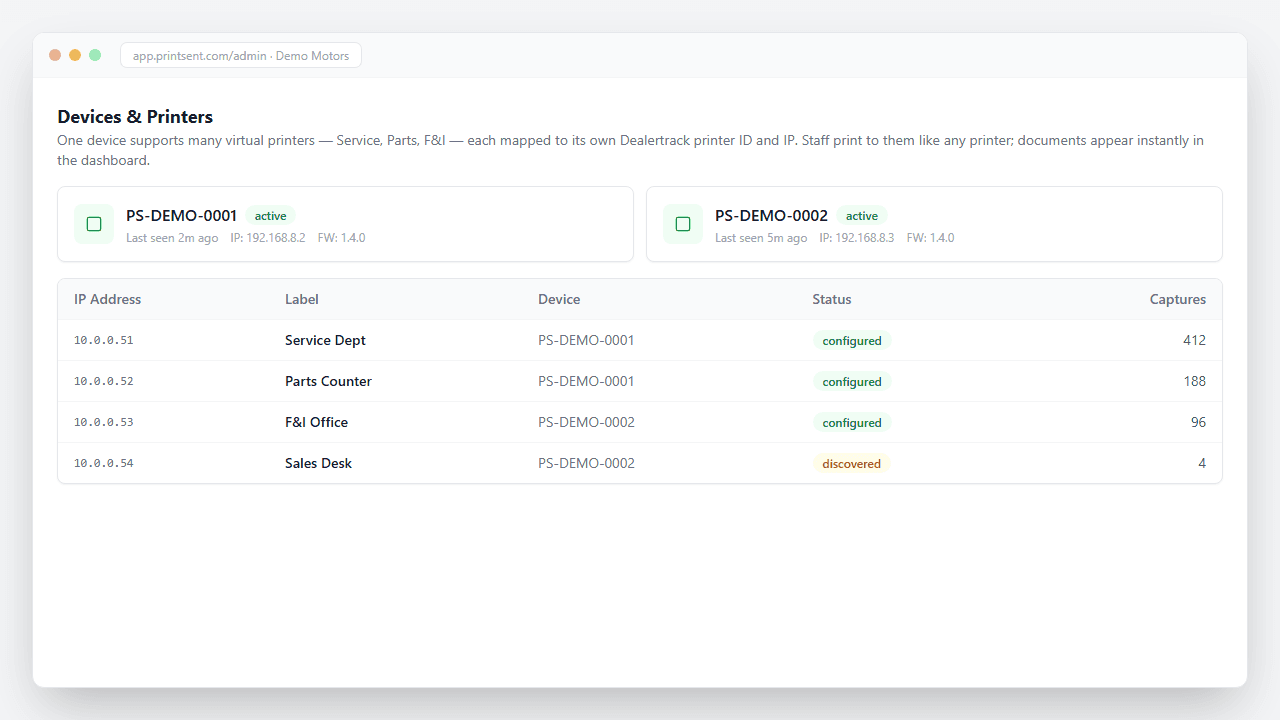
One PrintSent device supports many virtual printers — one for Service, one for Parts, and more — each mapped to its own Dealertrack printer ID.
Save Time & Money

Save thousands every month

Every page you don't print is money saved. PrintSent helps dealerships reduce or eliminate expenses tied to physical printing.

Paper & toner

Stop buying cases of paper and expensive toner cartridges that run out at the worst time.

Printer purchases

Reduce the number of dedicated printers you need to buy and maintain across your dealership.

Repairs & maintenance

Eliminate service calls, jams, and costly maintenance contracts on commercial printers.

Employee time

No more walking to the printer, sorting pages, scanning, or hand-delivering documents.

Better security

No more sensitive documents sitting in printer trays. Digital delivery means better control over who sees what.

Lower shredding costs

Less printed paper means less to shred. Reduce or eliminate paper shredding service fees.

A typical dealership spends $3,000–$6,000+ per month on printers, toner, paper, maintenance, and the labor spent on the print-scan-email cycle. PrintSent eliminates the printing you never needed on paper — the jobs that only print to be scanned and emailed, and the ones the DMS prints by default — for one flat monthly rate, so you can finally go as paperless as you want — and your documents arrive faster than your staff can walk to the printer.

Real savings in one month

$1,190

At one Dealertrack dealership — on pace for $14,275/yr

32.0 hrs

Time Saved

959

Documents

1,768

Pages Saved

333

Emails Sent

One month of actual usage at a Dealertrack dealership — $0.04/page in print costs avoided, plus ~2.0 min/document of staff time (walk + scan) at $35/hr. Conservative: excludes printer hardware, leases, service contracts, shredding & postage — the savings a dealership unlocks going paperless.

Key Features

Virtual printer features built for Dealertrack

Every form, full logos

Captures the complete print stream. Logos, borders, formatting — exactly like the printed page, with full branding intact.

View in the portal — auto-send optional

Every print lands in a shared digital tray your team can open right away. Optionally auto-route each document type to recipients or a shared department inbox — set once, runs automatically.

One device, many printers

A single PrintSent device handles unlimited Dealertrack printers. One ethernet cable, one power plug, done.

Nothing changes for your staff

They click Print in Dealertrack. That's it. No new software, no training, no workflow changes.

End the print-scan-email cycle

When customers or vendors need a document, your team forwards a professional PDF in seconds. No printing to scan.

Print what you need

When you need a hard copy, print to a different printer ID in Dealertrack or print the PDF from your email to any nearby printer.

Getting Your Documents

Opened in a secure portal — or sent to your inbox

Every PDF PrintSent captures is ready in a secure web portal — and can optionally be sent to an inbox too. Use the portal, inbox delivery, or both — whatever fits each department.

Opened in a secure web portal

No mailbox to set up. Assign staff to a printer and they open the same PDFs in a secure portal moments after printing — read-only, scoped to only the printers you assign.

Delivered to your inbox

Optionally route each document type to the recipients or shared department inbox you choose. A branded PDF arrives automatically in seconds — faster than walking to the printer.

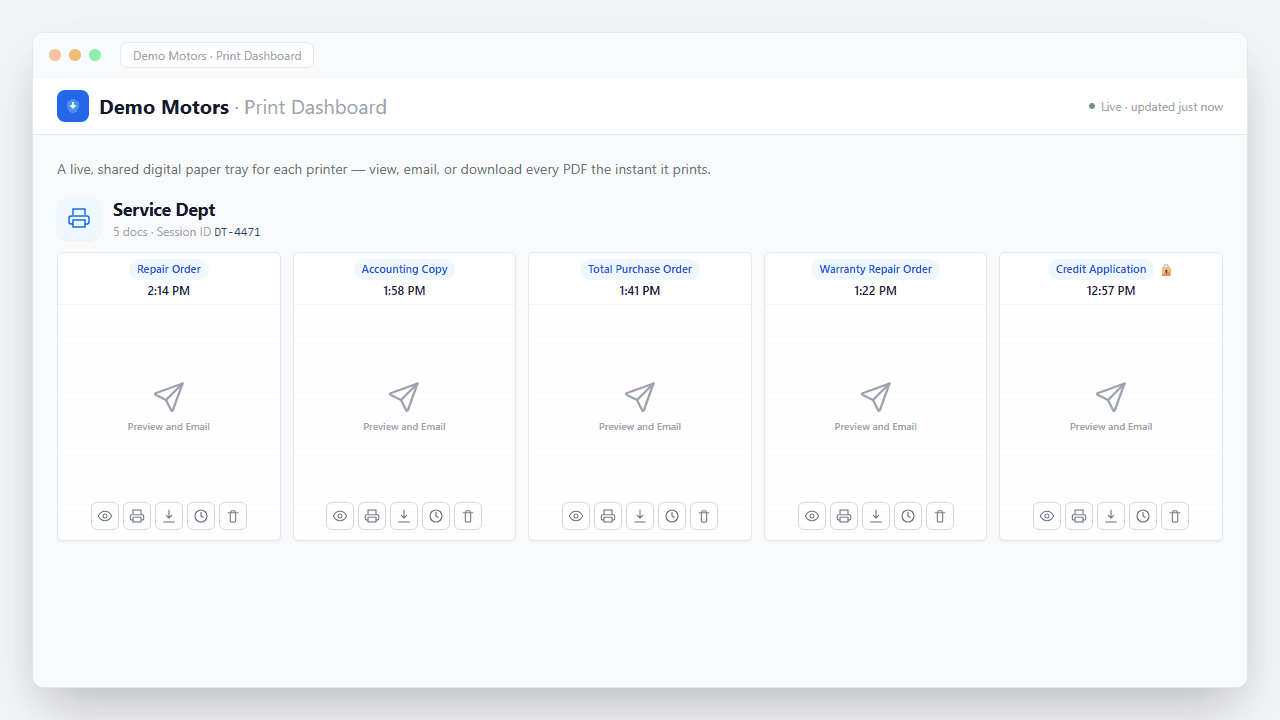
A live, shared digital paper tray where captured PDFs appear the instant they print — view, email, or download.
Document Types

Every form Dealertrack can print — sent as a PDF

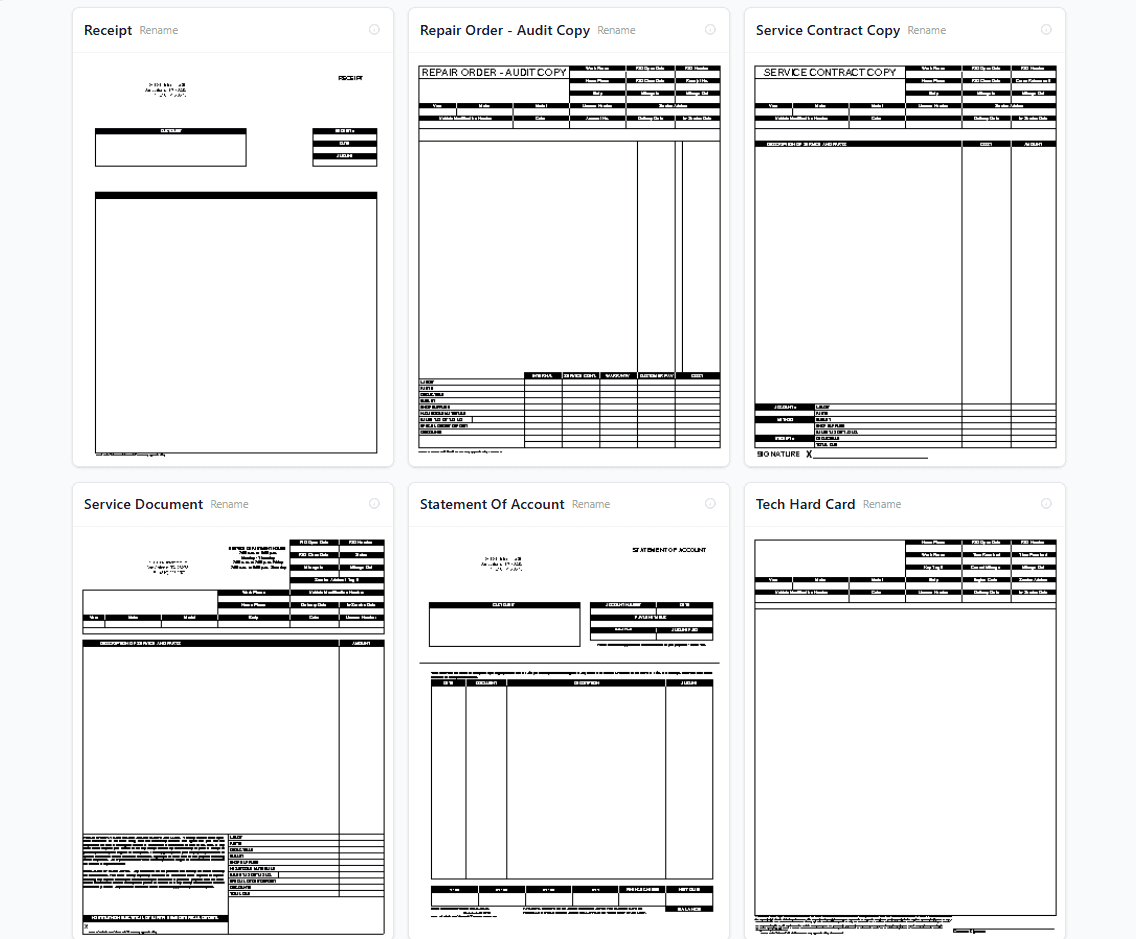
PrintSent automatically receives every form type and logo when you Send Logos to the PrintSent printer in Dealertrack, just like you do with other printers. No manual configuration — your logos are received and apply like normal.

Repair OrdersPurchase OrdersInvoicesCredit InvoicesStatements of AccountTech Hard CardsPicking TicketsService ContractsReceiptsCustomer Hard CardsWarranty Repair Orders& more
PrintSent templates page showing auto-discovered Dealertrack document types with logos
From the Field

What dealership teams are saying

Dealership staff using PrintSent today, in their own words.

I used to print Tech Hard Cards, walk to the New Car department to scan them on the better scanner, then email myself the PDF to forward to customers. Now I print from Dealertrack and the branded PDF just appears in our PrintSent portal — I forward it to customers without leaving my desk. I use it every day.
Service Advisor
It saves me a dozen trips a day — from my desk to the printer, then to the scanner, just to email a vendor invoice. When vendors ask for copies at month-end, I just open the PDF in the portal and forward it. Huge time saver!
Parts Warehouse Manager
For IT Providers

Manage IT for dealerships?

PrintSent offers a partner program with wholesale pricing and multi-dealership management tools. Help your clients go paperless — and add a recurring revenue stream for your business.

Learn about our partner program
FAQ

Common questions about PrintSent

Get Started

Ready to go paperless?

PrintSent is $400 a month per rooftop, plus a one-time $250 for the device. Add paperless PDF delivery to your Dealertrack workflow.

What would you like to do? *