The virtual printer for Dealertrack DMS

PrintSent appears on your network as a fully compliant printer Dealertrack already recognizes. It can capture any print job with full logos, and the pixel-perfect PDF appears instantly in a shared web portal — view, email, or download it — with no software to install.

PrintSent is an independent product and is not affiliated with, endorsed by, sponsored by, or certified by Dealertrack or its affiliates. Dealertrack and all other product names, logos, and brands are the property of their respective owners and are used here only to describe compatibility.

What It Is

A printer Dealertrack already understands

Dealertrack DMS came from an era when physical printers were the primary output option, and many of its forms are still designed to print to produce a complete document with logos and formatting. A virtual printer solves this by appearing to Dealertrack as a normal printer while capturing the output digitally instead of putting it on paper.

PrintSent is a small, pre-configured network device that emulates one or more fully compliant network printers — the exact printer type Dealertrack expects. Dealertrack recognizes it immediately, with no drivers, no workstation software, and no workflow changes. Your staff click Print exactly as they always have.

Each print job you route to it is captured with its full print stream intact, converted to a pixel-perfect PDF that appears in your portal instantly, and optionally sent to the email addresses you configure for each document type — within seconds.
Why It Matters

The gap a virtual printer fills

Physical printers

Produce perfect documents — then your staff scans and emails them back. Paper, toner, maintenance, and wasted time on every send.

Dealertrack QPRINT

Outputs digitally as text only, without logos or formatting — so it isn't a fit for anything customer- or vendor-facing.

PrintSent virtual printer

Full-fidelity PDFs with complete logos and formatting, ready in a shared portal to view, email, or download — no paper, no scanning, no QPRINT compromise.

How It Works

Three steps. Under 30 minutes.

1

Plug in the device

Connect it to your Dealertrack VPN-connected network with one ethernet cable and power. It picks up its network address automatically.

2

Add it in Dealertrack

Create a printer pointing to that IP. Dealertrack detects it as a Lexmark printer. Run Send Logos.

3

PDFs land in your portal

Every print appears in a shared web portal to view, email, or download — and can auto-route to the addresses you choose. Set once, runs automatically.

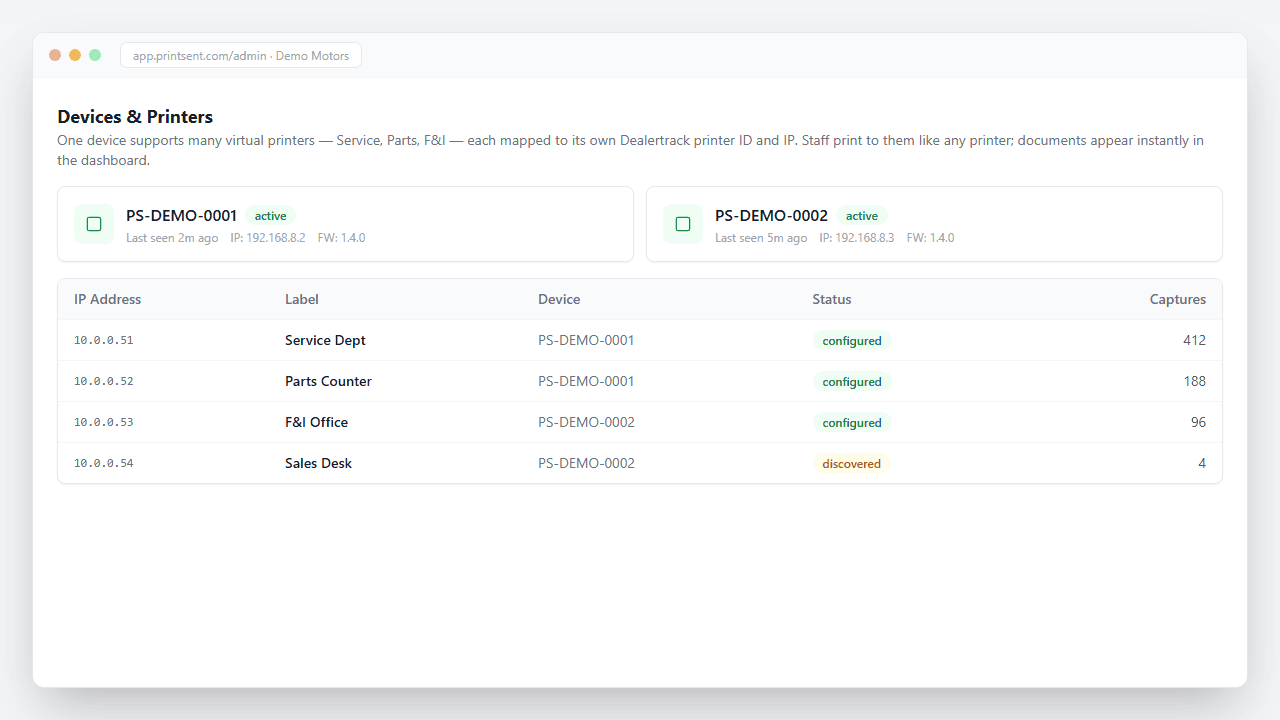
One PrintSent device supports many virtual printers, each mapped to its own Dealertrack printer ID and IP.

Frequently Asked Questions

Virtual printer questions

Get Started

Add a virtual printer to your Dealertrack workflow

PrintSent is $400 a month per rooftop, plus $250 for the device.

Pricing is flexible. Ask about multi-rooftop and dealer-group discounts, or a discounted pilot at one store to start.