Statement Sender

Email every vendor their Statement of Account — in seconds

Upload the Statement of Account PDF from your Dealertrack statement run and PrintSent splits it by account, matches each vendor to their email, and sends every statement at once. No printing hundreds of pages just to scan them back in. No envelopes. No postage.

PrintSent is an independent product and is not affiliated with, endorsed by, sponsored by, or certified by Dealertrack or its affiliates. Dealertrack and all other product names, logos, and brands are the property of their respective owners and are used here only to describe compatibility.

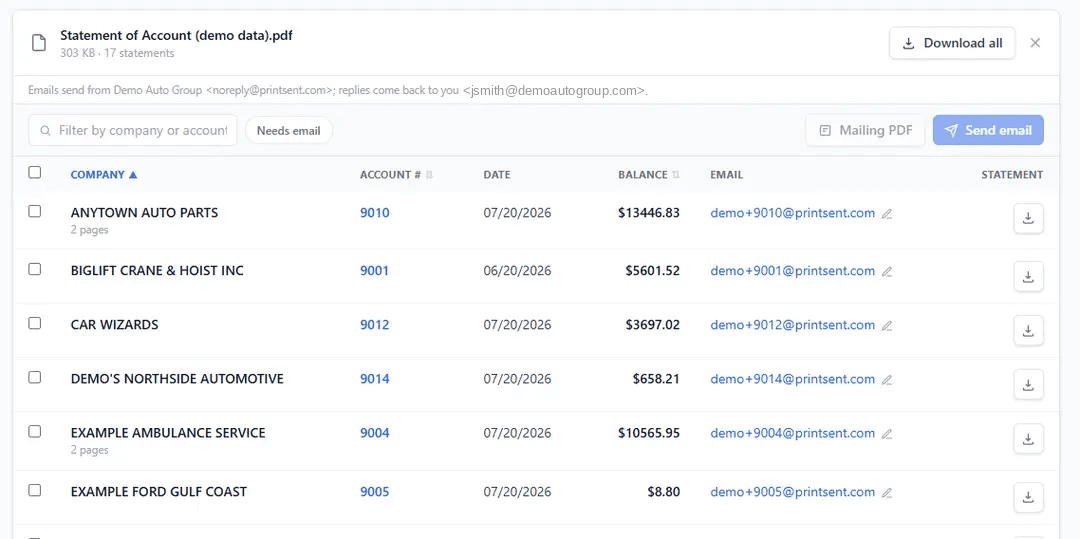
Statement Sender splits a Dealertrack Statement of Account PDF into one statement per vendor, each matched to a saved email address, with balances and page counts listed.

The Problem

Printing a statement run just to send it back out

Each month your Statement of Account run produces one giant PDF with every vendor's statement inside it. In most dealerships that document gets printed in full, sorted by account, folded, stuffed, stamped, and mailed — or printed only so someone can scan it back in and email each statement out one at a time.

For a store with a few hundred accounts, that is hours of work every month, plus paper, toner, envelopes, and postage — for documents that were already digital before anyone hit Print. And when a vendor calls asking for their copy, the whole search starts over.

Dealertrack prints the statement run beautifully. What it does not do is take that one combined document and get each vendor's piece of it into their inbox. That is the gap Statement Sender fills.
How It Works

Three steps, one pass

Upload the PDF PrintSent already produced, check the matches, and send.

1

Upload the PDF

Drag in the Statement of Account PDF PrintSent captured from Dealertrack. It is read and split into one statement per vendor.

2

Review & match

Each vendor is matched to its saved email. Add or edit addresses inline and preview exactly what will send — duplicates merged.

3

Send

One click emails every vendor their own statement. Anyone without an address is bundled into a single print-and-mail PDF.

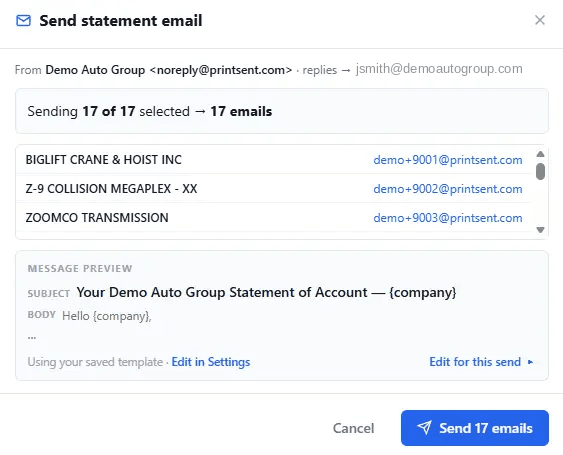
The send preview confirms 17 vendor statements going to 17 email addresses, showing the subject line and message template before anything is sent.

What You Get

Built for a real month-end statement run

Not a bulk-email tool bolted on, but a workflow shaped around how dealership statements actually go out.

Automatic splitting

One Statement of Account PDF becomes one clean statement per vendor, page-perfect, with multi-page accounts kept together.

Saved address book

An email and CC address per vendor, remembered month to month, so the second statement run is faster than the first.

One-click preview

See the exact send count, the merged duplicates, and the message itself before a single email goes out.

Replies come to you

Sent from a secure PrintSent address with the reply-to set to whoever sent them, so vendor questions land in your inbox.

Bounce worklist

Bad addresses surface automatically with a one-click fix, so a wrong email gets corrected instead of quietly failing.

Reusable template

Set your statement subject line and message once. Every following month reuses it, with room to edit for a single send.

Mailing fallback

Vendors without an email are collected into one combined PDF to print and mail, so no account is left out.

No duplicate sends

Statements already sent are skipped by default, and vendors sharing an address get a single combined message.

Statement Sender is part of PrintSent — $400 a month per rooftop, plus $250 one-time for the device, with no per-statement or per-email fees. See what else is included.

Frequently Asked Questions

Emailing statements from Dealertrack

Get Started

Send this month's statements without printing them

PrintSent is $400 a month per rooftop, plus $250 for the device. Setup takes under 30 minutes.

Pricing is flexible. Ask about multi-rooftop and dealer-group discounts, or a discounted pilot at one store to start.